Why the Numpad Stopped Working in English Mode on Waydroid: Reading the Android and Waydroid Source

Inside Waydroid, which runs Android on Linux, the numpad stopped typing digits. With Gboard set to Japanese, it worked. With “English (US)”, it did not. The digit row above the letters worked in both. On the host (Arch Linux, sway), the numpad typed digits normally. Adding input * xkb_numlock enabled to the sway config did not help. I looked into why, using the source code and measurements. Summary The host’s NumLock state is not passed to the Android inside Waydroid. The sway setting has no effect on Waydroid. Android’s own NumLock state is probably being cleared right after it is set. The source and the measurements agree, but I did not observe the value that does the clearing. Adding a keyboard layout through an Android app, one that maps the numpad to digits, made the numpad type digits in English mode. What the source says I read Waydroid’s HWC (hwcomposer/wayland-hwc.cpp in android_hardware_waydroid), the input code of Android 13 (android13-release), and the patches Waydroid applies (android_vendor_waydroid). ...
pavucontrol wouldn't start. Chasing it led from a WirePlumber Lua bug down to a USB protocol error

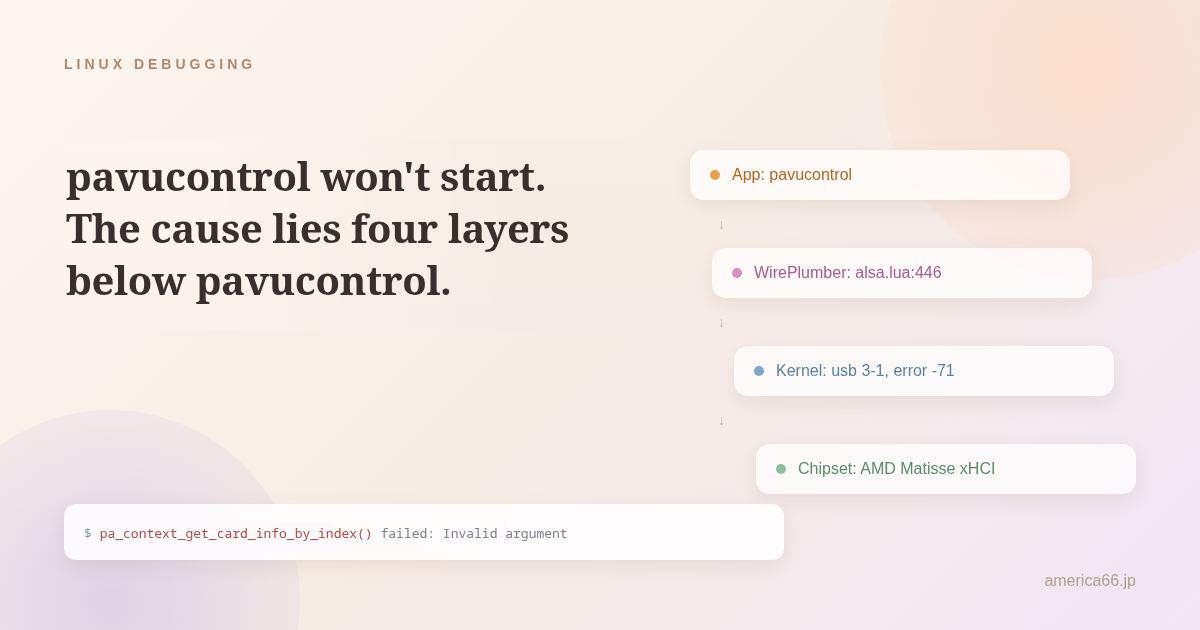
I tried to open pavucontrol to adjust the volume, and got this instead: pa_context_get_card_info_by_index() failed: Invalid argument Copy That’s it. It wouldn’t open. Environment: Arch Linux, sway, PipeWire 1.6.8, WirePlumber 0.5.16. It looked like the usual “the PulseAudio compatibility layer is in a mood” kind of problem. Once I actually started digging, it went deeper than expected. Start with journalctl Checking the logs via systemctl --user status pipewire pipewire-pulse wireplumber, both pipewire and wireplumber were spewing the same error every 3-5 seconds — and it was happening live, while I was investigating. ...

I Narrowed Down a sudoers NOPASSWD Rule, and My PC Shut Down on Its Own Twice

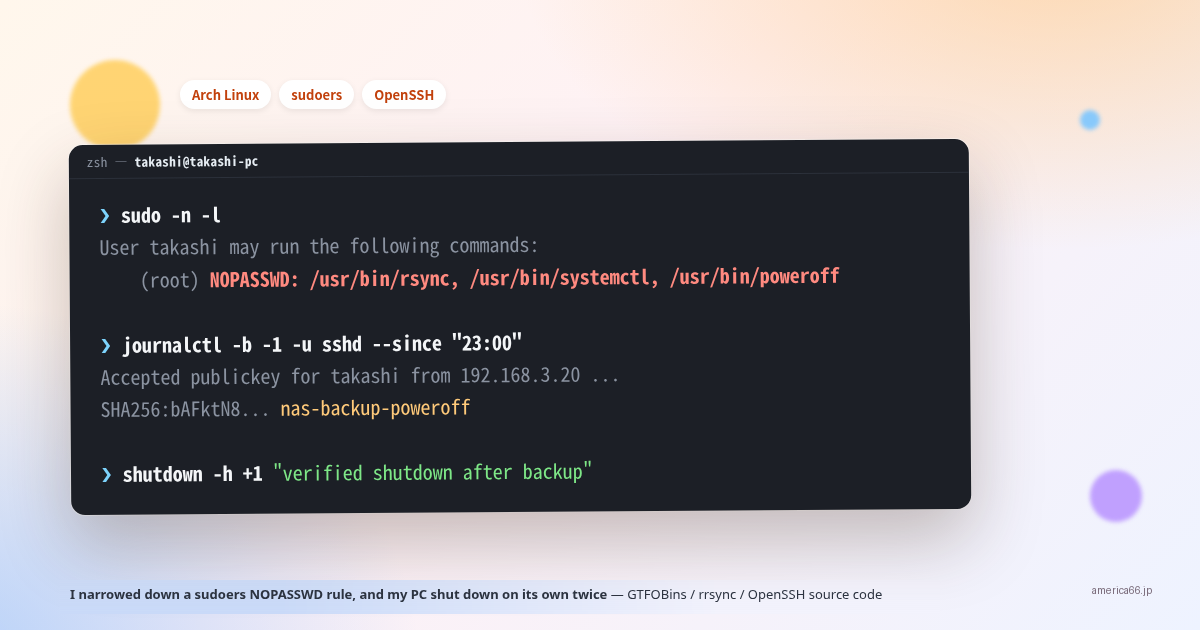
I typed sudo systemctl restart bluetooth, and it ran without asking for a password. Something was wrong. That single observation led through a GTFOBins lookup, a full SSH key redesign, a fight with rrsync, and eventually reading the OpenSSH source itself. The story ends with an unsatisfying twist: my PC powered itself off twice, and I never fully found out why. The trigger: no password prompt Bluetooth was acting up, so I ran sudo systemctl restart bluetooth. It should have asked for my password. It didn’t, and I hadn’t used sudo recently. Something was off, so I ran sudo -n -l (list what I’m allowed to run without a password, without prompting for one). ...

Giving Up on an Encrypted Waydroid Cache and Recovering Chat History from PSN's Private API Instead

I wanted to save an old chat history with a friend on PlayStation Network (PSN) before it disappeared somewhere. I run the PS App inside Waydroid (a way to run Android on Linux) on my PC. The obvious first move — read the local cache file directly — turned into a longer investigation than expected. The local cache was encrypted Waydroid stores each app’s data under ~/.local/share/waydroid/data/data/<package-name>/, mirroring Android’s own /data partition layout. Inside the PS App’s folder, databases/ had some promising-looking files. ...

Termux's sshd Logs You In as the Same User Whatever Name You Send — Reading the Patch

I added an entry to ~/.ssh/config so I could scp images from my desktop to my Pixel 6 (running Termux’s sshd), and I put a User in it. Then I noticed: when the other end is Termux, ssh banana@<phone> and ssh root@<phone> both log in as the same user. The User line in ~/.ssh/config does nothing. It’s not a config problem — it’s how Termux’s OpenSSH is built. First, the observation $ ssh -p 8022 banana@100.65.202.69 'whoami' u0_a440 $ ssh -p 8022 root@100.65.202.69 'whoami' u0_a440 Copy banana and root both connect, and both land as u0_a440 (the Termux app’s user). The key is checked only against /data/data/com.termux/files/home/.ssh/authorized_keys. ...

Three treesitter Errors From Migrating nvim-treesitter master → main (Neovim 0.12): attempt to call method 'range' (a nil value)

Around the time I bumped Neovim to 0.12.4, nvim-treesitter errors started piling up one after another. Tracing them all leads back to a single fact: nvim-treesitter’s master branch is already EOL and can’t keep up with Neovim 0.12. Migrating to the main branch fixed it, but here’s the path there — plus one more pitfall I stepped on after the migration. Environment: Item Value Neovim v0.12.4 (Arch Linux) nvim-treesitter master (tag v0.10.0, frozen May 2025) → migrated to main Plugin manager Lazy.nvim Symptom 1: Opening Markdown crashes on a gotmpl parser The moment I open a Markdown file, it halts with an error (Press ENTER or type command to continue). ...

Chasing a swayfx scratchpad crash: a fork/upstream mismatch found with git blame

The symptom On my everyday swayfx setup, bringing a scratchpad window up and then hitting scratchpad show a second time (the toggle’s “hide” path) crashed the whole compositor. It threw me all the way back to the SDDM login screen — a loud crash. Environment: Item Value swayfx 0.5.3-4 (based on sway 1.11.0, Arch Linux package) wlroots 0.19.3 GPU AMD Radeon RX 6600 XT (amdgpu) The bindsym was: bindsym $mod+minus scratchpad show, resize set width 90 ppt height 90 ppt, move position center Copy scratchpad show chained with resize and move in one command. Press it twice in a row (first press shows the window, second press is hit while it’s still focused, which takes the hide path) and it crashes. ...

Japanese Input Not Working in Street Fighter 6 (Proton) — Fixed by IME Variables in /etc/environment

Correction (2026-08-08) The original conclusion of this article — “this cannot be resolved through user configuration” — was wrong. Setting IME environment variables in /etc/environment made Ctrl+Space work for direct input. If you only want the fix, jump to Update: Solved. The investigation below is kept as-is, as a record of how I reasoned my way to the wrong conclusion. Symptom Pressing Ctrl+Space (the fcitx5 trigger key) in Street Fighter 6’s chat box does not switch to Japanese input (Mozc). Text stays in romaji and nothing responds. ...